| Welcome, Guest |
You have to register before you can post on our site.
|
| Online Users |
There are currently 560 online users.
» 4 Member(s) | 552 Guest(s)
Applebot, Bing, Facebook, Google, MichaelGetry, Romdastt
|
|
|
| Solo and Group Play with U4gm D2R War Cry Builds |
|
Posted by: JaccckyIceee - 11-03-2026, 06:46 AM - Forum: My Forum
- No Replies
|
 |
War Cry Barbarian leveling in D2R is about keeping enemies under control while managing the mana your attacks consume. You can browse D2R Ladder Items for equipment options, but your skill investment and positioning matter just as much as the gear you bring.
How does a War Cry Barbarian level in D2R
The build rewards a controlled pace. You use War Cry to manage groups, then keep casting long enough to clear them without letting your mana run dry at the wrong moment.
Early on, pay attention to how each fight feels rather than judging the build by one quick encounter. A group that takes too long to clear can expose problems with damage, mana sustain, or the position you chose before engaging.
How should you invest skills while leveling
Think of skill investment as a tradeoff between damage and the support you need to keep fighting. Raising the skills that support your approach can make clearing feel better, but your available mana and equipment still affect how consistently you can use them.
After spending points, revisit an encounter that gave you trouble and judge the result. If enemies go down more comfortably but you still run out of mana, more damage alone may not solve the problem slowing your progress.
How do you manage mana on a War Cry Barbarian
Watch your mana throughout a fight, not just when it is nearly gone. Repeated casting is central to the build, so entering the next group with too little mana can turn a manageable encounter into a scramble.
Give yourself room to pause and recover when the pace starts working against you. Equipment that helps sustain mana can be useful, but judge it by how much smoother your actual runs feel rather than by treating it as a substitute for good positioning.
Where should you position a War Cry Barbarian
Approach groups with space to move. Fighting from a position that leaves you a way out is safer than committing so far into a pack that you have few options when your mana gets low.
Keep an eye on the enemies around you as well as the group you are attacking. Crowd control is most useful when it helps you maintain a manageable fight, not when it tempts you to pull more enemies than you can comfortably clear.
Is War Cry Barbarian good for solo and group play
Solo, you need to cover your own damage, mana sustain, and safety. That makes a steady clearing pace valuable: a faster opening is less useful if you have to stop repeatedly or retreat from every difficult group.
In a group, your crowd control can support the rest of the party while you contribute damage. Watch how quickly the group moves and avoid getting isolated while trying to keep up with players who are clearing at a different pace.
What gear should you prioritize while leveling
Look at equipment in the context of the problem you are trying to fix. More damage can help clearing speed, while better mana sustain can make repeated casting less disruptive; the stronger choice depends on what is holding you back.
Skill levels matter too, so reassess your setup as your build develops. A piece that feels helpful in one stretch of leveling may be less attractive once another part of your setup changes.
Finally, keep the build focused on controlled fights, sustainable casting, and enough damage to maintain your pace. Check D2R Items as you review your equipment, then return to a difficult area and see which change makes the next run feel safer and more consistent.
|

|
|
| Click Here: How to Evaluate Online Downloads Before You Proceed |
|
Posted by: sambillings - 11-03-2026, 06:29 AM - Forum: My Forum
- No Replies
|
|
The internet makes it easy to discover software, tools, guides, and digital resources. With a few searches, users can find information about applications, explore different websites, and compare available options. However, not every page provides the same level of reliability. Before selecting a download or following an instruction, it is important to understand what a website offers and whether its information can be trusted.
The phrase Click here often appears on websites as an invitation to open another page, view additional information, or continue to a particular resource. Although these words look simple, users should understand where a link leads before selecting it. A clear and careful approach can help make online browsing safer and more productive.
Why Link Awareness Matters
Links connect different pages and services across the internet. They can direct users to articles, software information, support resources, downloads, and external websites.
A link's label does not always explain its destination. For example, a button that says "Click here" may lead to a page with detailed instructions, a product description, or a file download. Users should not assume that every link leads to the resource they expect.
Before opening a link, consider the surrounding information. Does the page explain what you will find after selecting it? Is the website relevant to your search? Does the destination appear consistent with the description?
These small checks can help you avoid confusing pages and unwanted downloads.
Understand What a Website Offers
When visiting a website that discusses a digital tool, begin by exploring its main purpose. Read the introduction and identify the type of information it provides.
A useful website should explain its subject clearly. Visitors should be able to understand whether they are reading an overview, a tutorial, a troubleshooting guide, or information about a particular application.
Look for relevant sections that answer common questions. These may include features, supported platforms, usage information, limitations, updates, and frequently asked questions.
Avoid making a decision based only on a headline or a large download button. Reading the available information first gives you a better understanding of what the website actually provides.
Check Software Information Before Downloading
Downloading software requires more care than opening an ordinary article. A file can affect your device, stored information, and privacy, so it is important to evaluate it before proceeding.
Start by identifying the publisher or developer. Check whether the application has a recognizable source and whether its description explains its purpose.
You should also review the version information, release details, and supported platforms. An application designed for one operating system may not work correctly on another. Similarly, an older version may have limitations that are not present in newer releases.
If a website does not provide clear information about a file, avoid treating its download option as automatically trustworthy. It is better to investigate further than to install something without understanding its origin.
Review the Purpose and Features of Digital Tools
Different applications are designed to solve different problems. Some help users organize tasks, others provide editing features, and some are built for entertainment or specialized activities.
Before choosing a tool, consider what you actually need. A long list of advertised features does not necessarily mean that an application is suitable for your situation.
Compare the available information with your requirements. Think about ease of use, device compatibility, performance, privacy, and the amount of access the application requests.
For tools that interact with other software or online platforms, pay particular attention to their permissions and terms. Understand what the application can access and whether its behavior follows the rules of the platform involved.
A careful comparison can help you avoid unnecessary installations and choose resources more confidently.
Protect Your Device and Personal Information
Online safety should remain a priority whenever you browse unfamiliar websites or consider installing software.
Some websites may display misleading advertisements, unexpected redirects, or download prompts that do not match the information being viewed. Others may request sensitive details without explaining why they are needed.
Follow these precautions when exploring unfamiliar resources:
Keep your operating system and security software updated.
Use trusted sources when obtaining applications.
Review file details before opening downloaded content.
Avoid providing passwords or verification codes to unknown websites.
Be careful with unexpected pop-ups and redirects.
Do not disable device protections simply because a website requests it.
Review application permissions before granting access.
These habits do not guarantee complete protection, but they can reduce exposure to common online risks.
Read Instructions Instead of Rushing
A website may provide instructions for accessing a tool or understanding its features. Reading these instructions carefully can prevent confusion and unnecessary mistakes.
Begin with the overview and then review any relevant steps. Pay attention to warnings, compatibility notes, and limitations. If an instruction is unclear, look for an explanation from a reliable source rather than guessing.
Do not follow steps that ask you to bypass security protections, provide account credentials, or install unknown files without a clear reason.
Good instructions should help users understand what they are doing. They should not pressure visitors into taking actions they cannot evaluate.
Understand Updates and Compatibility
Software changes over time. Developers may release updates to improve performance, address technical problems, or change how an application works.
This means that information published in an older article may not accurately describe the current version. Check the date of a guide and compare its details with recent information from the relevant publisher.
Compatibility is another important consideration. A tool may require a particular operating system version or hardware capability. If your device does not meet those requirements, the application may fail to work as expected.
Before installing anything, confirm that the software is intended for your device. Avoid assuming that a file is compatible simply because its name resembles the application you are searching for.
Recognize Misleading Download Pages
Some pages use attention-grabbing messages to encourage visitors to select a button quickly. They may display several download options, countdowns, or claims that a particular action is required.
Take time to identify the actual destination of each button. A page may contain advertisements that look similar to its main content, so visual appearance alone is not enough to establish reliability.
Be cautious when a website:
Promises results that sound unrealistic.
Hides the identity of the software publisher.
Provides little information about the file.
Uses repeated redirects before showing the requested page.
Demands unnecessary personal details.
Encourages users to ignore security warnings.
If something feels unclear, leave the page and look for better information. There is no need to continue simply because you have already opened a website.
Make Better Decisions When Browsing
A good browsing routine begins with a clear purpose. Decide what information or resource you need before opening multiple pages.
Compare more than one reliable source when the decision involves software or device security. Check whether the information is consistent and whether the publisher provides supporting details.
You can also keep a record of useful resources, including their purpose and the date you reviewed them. This makes it easier to distinguish current information from older references.
Most importantly, do not let a prominent button replace careful judgment. A link is only a route to another page; it is not proof that the destination is safe, useful, or appropriate.
Conclusion
The phrase Click here is commonly used to guide visitors toward another online resource, but users should always understand a link's destination before proceeding. Whether you are reading a software guide, exploring an application, or considering a download, checking the source and reviewing the available information are important steps.
Take time to understand a website's purpose, verify software details, check compatibility, and protect your personal information. Avoid unfamiliar files and instructions that ask you to bypass security measures.
Responsible browsing is not about avoiding every new website. It is about making informed choices. By evaluating links carefully and choosing reliable sources, you can explore digital resources with greater confidence.
|
|
|
|
| U4gm CoD MW4 ISO Nightshade Close-Range Playbook |
|
Posted by: JaccckyIceee - 11-03-2026, 06:19 AM - Forum: My Forum
- No Replies
|
|
The ISO Nightshade in CoD MW4 suits players who want to close distance, clear rooms, and keep pressure on an objective. If you're also planning around MW4 DMZ Cash during a session, keep the weapon's role in mind: it rewards quick movement and close fights, not drawn-out contests across open ground.
Is the ISO Nightshade good for close-range fights
Close quarters are where the Nightshade makes the most sense. It feels suited to the moments when you're moving through a building, approaching a corner, or pushing into a contested space. Rather than waiting for a distant opponent to make a mistake, you're trying to take a fight on ground that favors your weapon.
That doesn't mean rushing every doorway. As you approach a room, think about where an opponent might appear and how quickly you can bring your aim onto them. Moving with purpose gives you a better chance to react than sprinting straight through an entrance without a plan.
When you win space, use it to keep the push moving. Clear the immediate area, check the next corner, and decide whether you can continue or need a moment to reset. The Nightshade's close-range focus is most useful when you can keep engagements short and avoid being pulled into a long sightline.
How should you build the ISO Nightshade
Prioritize aiming speed, mobility, and recoil control. Those qualities support the way the Nightshade is meant to be used: getting into position, responding quickly, and keeping shots manageable while you fight at close range.
Think about the trade-offs rather than chasing one quality at the expense of everything else. A setup that helps you move quickly is less appealing if you struggle to control the weapon once a fight starts. Likewise, a more controlled feel won't help much if the weapon no longer responds comfortably as you move between corners.
Use your own matches to judge the balance. If opponents regularly catch you before you can aim, focus more on responsiveness. If you can bring the weapon up quickly but have trouble keeping it on target, give recoil control more attention.
How do you play objectives with the ISO Nightshade
On an objective push, look for a route that lets you approach through cover and take close fights. Buildings and corners can help you break up your approach, while open lanes expose the Nightshade to opponents using rifles better suited to distance.
Once you're near the objective, don't assume you have to be the first player through every entrance. Pay attention to the space your team is contesting, then move into a position where you can challenge an opponent nearby. The goal is sustained pressure, not a single hurried push that leaves you exposed.
If a fight turns into a prolonged long-range duel, consider moving rather than forcing it. Breaking away and finding a closer angle keeps you playing to the weapon's strengths. You won't always get an ideal route, but recognizing an unfavorable fight is part of using the Nightshade well.
The ISO Nightshade is a close-range choice for players who like to move and press objectives. Start with a balance of aiming speed, mobility, and recoil control, then adjust according to the fights you're losing. Separately, you can buy Modern Warfare 4 DMZ Cash if that fits your plans for a session.
|
|
|
|
| Grow A Garden 2 Mushroom Effect Limits Explained by U4gm |
|
Posted by: JaccckyIceee - 11-03-2026, 05:39 AM - Forum: My Forum
- No Replies
|
|
The Invisibility Mushroom in Grow A Garden 2 is described as a temporary invisibility item, but that description leaves some practical questions open. If you're comparing Grow a Garden 2 Items for multiplayer use, treat this one as unconfirmed until you've checked what other players can actually see.
Does the Invisibility Mushroom make you completely invisible
Temporary invisibility doesn't necessarily mean your entire presence disappears from another player's view. The effect might hide the character model without hiding every indication that you're nearby, so the item description alone isn't enough to settle that question.
Ask another player to watch while you use the mushroom, then compare what you see on your own screen with what they see. That distinction matters in Grow A Garden 2: your view can tell you an effect started, but another player's view tells you how concealed you are.
How long does the Invisibility Mushroom last
The available description says the effect is temporary, but it doesn't give a duration. Don't assume it will last long enough to reach a particular spot or get away from another player.
When you check it in Grow A Garden 2, pay attention to when the effect begins and when the other player can see you again. Repeat the check before relying on your first impression, since a rough sense of time can be misleading during a busy encounter.
Can other players see you while you're invisible
That's the question to settle before treating the mushroom as a reliable escape option. Seeing your own character change isn't proof that another player has lost sight of you completely.
With a willing partner, compare their view while you're standing still and while you're moving. You're checking the limits of the effect, not assuming it hides the same things in every situation.
Do actions cancel the Invisibility Mushroom effect
The supplied description doesn't say which actions, if any, end invisibility early. Until you've checked, don't plan around staying hidden while interacting with other players or doing something else during the effect.
Try one action at a time with another player watching, and check whether you become visible afterward. Keeping each check separate makes it easier to tell what happened instead of guessing which action caused a change.
Is the Invisibility Mushroom useful for escaping
It could be useful for escape, but that depends on details the description doesn't confirm: how long it lasts, what it hides, and whether your actions end the effect. A short or limited effect calls for a different plan from one that keeps you concealed for longer.
Use what you learn from a multiplayer check to judge it for your own play. If another player can still track you, or the effect ends before you can act, don't treat the mushroom as a guaranteed way out.
What should you check before using the Invisibility Mushroom
Focus on three things: what another player can see, how long the effect lasts, and whether an action changes it. Those answers are more useful than assuming that the item name tells you everything.
Keep the results tied to what you actually observed in Grow A Garden 2. If a check leaves you unsure, repeat it with a partner rather than filling the gap with a guess.
The Invisibility Mushroom may give you a temporary way to stay out of sight, but its practical limits still need checking. Meanwhile, you can browse Grow a Garden 2 Items online and make your next step a multiplayer check before counting on the effect.
|
|
|
|
| Finding the Right Wellness Routine |
|
Posted by: kesavanr - 11-03-2026, 04:58 AM - Forum: My Forum
- No Replies
|
|
Physical relaxation often gets overlooked when daily schedules become demanding. Sitting for extended periods, commuting across the city, exercising, or simply managing a busy routine can leave the body feeling tired and tense. In such situations, massage can be viewed as one way to create dedicated time for rest and body awareness. When considering a Body Massage in Chennai, it can be useful to look beyond the setting and think about the type of massage, level of pressure, hygiene, therapist experience, and overall atmosphere. A suitable wellness space should allow people to feel at ease without making unrealistic promises. Exploring different options and understanding what each setting offers can help individuals choose an experience that fits naturally into their regular approach to relaxation and self care.
Also Check: Body Massage in Velachery | Body Massage in Anna Nagar
|
|
|
|
| Pokémon TCG Pocket in Late 2026: Events, Expansions, and a Shifting Meta |
|
Posted by: xtameembb - 11-03-2026, 04:22 AM - Forum: My Forum
- No Replies
|
|
By late October 2026, Pokémon TCG Pocket has settled into a busy, data-rich rhythm. The game’s supporting hub now reads like a living record of everything a player might need: deck-building tools, collection tracking, card and deck databases, tournament schedules, cosmetics coverage, a trade hub, news, guides, and a metagame section anchored by regular tier lists. The breadth is striking. How does one digital card game sustain so many parallel conversations? The answer sits in the cadence of updates, events, and expansions that the hub documents almost daily.
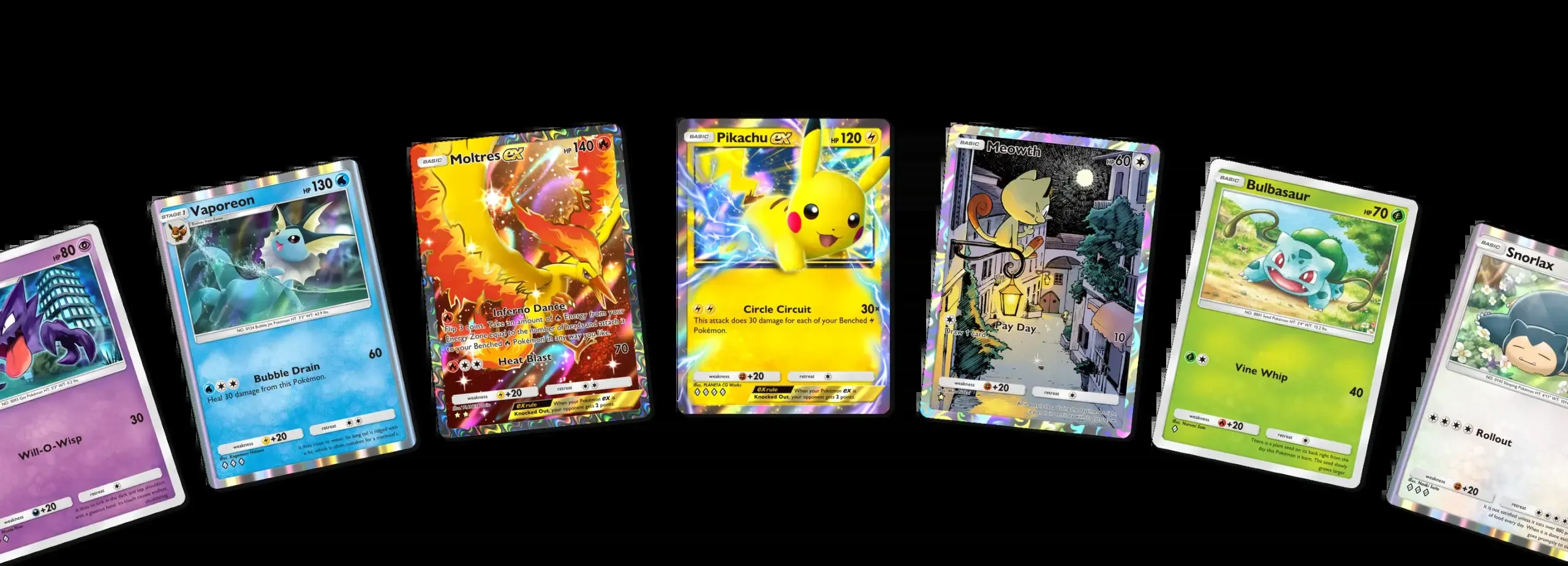
A Hub for Collectors, Competitors, and Curious Newcomers
The hub is organized around practical needs rather than a single content type. Build Decks and Track Collection sit alongside Meta Tier List, Cards, Decks, Tournaments Schedule, Cosmetics, and a New Trade Hub. That mix says a lot about the audience. Some players arrive to chase a favorite card, some want a ranked-ready list, and others simply want to know which event is live before the reset. The result is a destination that treats collection, competition, and community as connected parts of the same hobby.
Is that not the real test of a card-game hub in 2026? A player should be able to move from curiosity to a finished deck without losing the thread. The visible structure suggests exactly that: tools for building, references for checking, schedules for planning, and news for context.
October 2026: A Crowded Calendar
The late-October schedule is especially dense. A snapshot of the most recent entries shows a blend of guides, events, expansions, and metagame updates, all published within a few weeks of one another.
Date
Category
Focus
October 30, 2026
Guides
Two-star Trainer feature
October 30, 2026
Events
Reissued Wonder Pick
October 30, 2026
Events
Rayquaza Elite event
October 30, 2026
Events
Mega Mewtwo promo
October 30, 2026
Events
Bonus Week for Dual Fusion
October 29, 2026
Events
Second-anniversary celebration
October 29, 2026
Events
Dual Fusion emblem event
October 29, 2026
Expansions
FP expansion coverage
October 19, 2026
Expansions
Dual Fusion expansion
October 15, 2026
Guides and Events
Mega Garchomp drop event
October 14, 2026
Metagame
Tier list update
October 14, 2026
Events
B4B ranked emblem
October 10, 2026
Metagame
Tier list update
That table is more than a list of headlines. It shows how Pokémon TCG Pocket keeps multiple player motivations active at once. Limited-time events create urgency, expansions reset deck-building assumptions, and tier lists give the competitive scene a shared reference point. The mix is broad, but the categories remain clear.

Metagame and Tier Lists
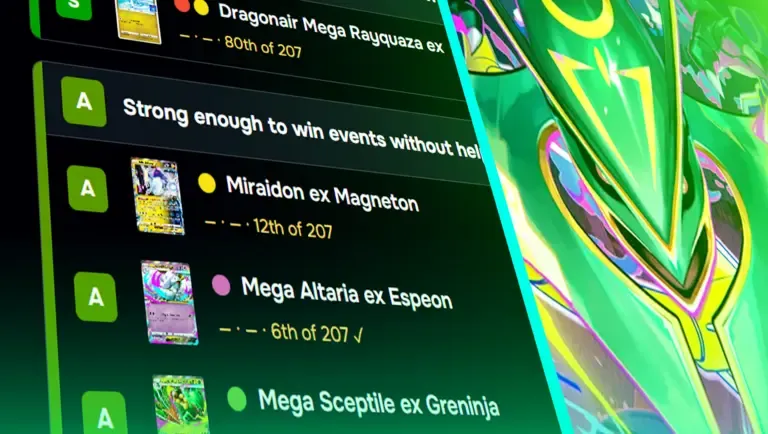
The metagame coverage is one of the hub’s strongest signals of health. Tier lists appear on October 14 and October 10, only days apart, which suggests a format moving quickly enough to justify frequent check-ins. Events such as the B4B ranked emblem and the Dual Fusion emblem event add another layer: competition is not only about raw deck strength, but also about timing, participation, and reward planning.
What separates a good deck from a great one in a format this active? The answer usually involves more than a single powerful card. Players need to understand matchups, event-specific incentives, and the way new expansions shift existing assumptions. The tier-list updates provide a map, while the deck and card sections provide the raw materials. Together, they turn the hub into a practical companion rather than a passive news feed.
Guides and Events for Every Ambition
The guide section is equally varied. A beginner’s guide sits beside advanced event breakdowns, including coverage of Team Rocket’s Lapras drop event, the Houndoom drop event, and the Mega Garchomp drop event. Drop events are especially interesting because they combine exploration, combat, and reward chasing. They ask players to solve a small problem, not just copy a list.
Wonder Pick coverage also remains prominent. Reissued Wonder Picks, a Wonder Pick 2026 feature, and themed picks such as Fennekin and Pachirisu show how the game keeps collection progress feeling eventful. For collectors, these are not side notes. They are the main event. For competitors, they are opportunities to fill gaps before the next ranked push. Can a single feature serve both groups at once? In Pokémon TCG Pocket, the answer is often yes.
Expansion Waves and Anniversary Energy
The expansion calendar tells a similar story. Dual Fusion and FP appear in late October, while Team Rocket Ambitions and Deluxe B4B coverage earlier in the fall show a steady release rhythm. The second-anniversary celebration and Bonus Week for Dual Fusion add a festive layer, and the Parallel Mass Outbreak event suggests that limited-time content is being used to keep the world feeling active between major drops.
This is a lot to track, but the hub’s category system keeps the noise manageable. Expansions sit with expansions, events with events, and metagame analysis with metagame analysis. The result is a clear separation between what is permanent, what is temporary, and what is competitive.
Tools, Trading, and Community
Beyond news and guides, the presence of a trade hub, tournament schedule, cosmetics coverage, and collection tracking points to a maturing ecosystem. A card game needs more than cards. It needs planning tools, social infrastructure, and reasons to return. The hub reflects that reality by treating deck building, collecting, and competition as connected workflows.
As 2026 moves toward its final weeks, Pokémon TCG Pocket looks less like a single app and more like a full calendar of interlocking pursuits. The late-October lineup is crowded, but it is also coherent: events create momentum, expansions create change, and tier lists create conversation. For players, the challenge is no longer finding information. It is deciding which part of the hobby deserves attention first. ?
With so many expansions and limited-time events arriving in quick succession, it’s easy for the hobby to stretch a budget. That’s where a site like DealNest can help—players who want to keep up without overspending can use it to find the best deal on everything from gaming accessories to Pokémon-related merch and gift cards. It’s a small practical step that keeps the focus on playing rather than price hunting.
|
|
|
|
| Silksong Lore Reveals Hornet's Past Lovers and Playful Personality |
|
Posted by: xtameembb - 11-03-2026, 02:03 AM - Forum: My Forum
- No Replies
|
|
Hollow Knight: Silksong has done far more than expand the series' combat and exploration; it has quietly deepened the character of its protagonist, Hornet. Since the sequel's release, players have combed through Hunter's Journal entries and uncovered surprising details about her romantic history, her lifespan, and her unexpectedly warm personality. In 2026, the community's lore excavation continues to yield fresh discoveries about Hallownest's princess-protector.

?️ A Romantic Past Hidden in the Journal
One of the most discussed revelations comes from the Great Conchfly entry in Hunter's Journal. The conchfly is described as an insect that pairs with only one mate for life and never leaves its partner. Reflecting on this behavior, Hornet recalls that she once desired a similar union. More importantly, she confirms that she has fallen in love at least twice in the past. Her mates are no longer part of her life because they could not match her lifespan, and as a result, she no longer seeks to pair with another.
The detail has sparked widespread fan discussion. Some players note that female spiders often outlive their mates in real life, which may be a deliberate nod to Hornet's lineage. Her mother, Herrah, was a spider, and her father, the Pale King, was no ordinary bug either. Together, these facts suggest that Hornet may have inherited an exceptionally long lifespan. While this remains speculation, the journal entry makes one thing clear: Hornet has lived long enough to experience multiple relationships and may be far older than earlier appearances suggested.
? Personality Beyond the Warrior
Hornet's journal entries also reveal a likable and curious side that contrasts with her stoic, agile warrior persona. In several entries about hostile bugs, she describes her feelings with surprising tenderness. She expresses a desire to touch their fur or admire their round, soft bodies. These small reflections paint her as someone who observes the world with affection, not just battle-ready vigilance.
Fans have embraced this humanizing detail. It adds warmth to a heroine who has often been defined by mystery and duty. The journal's voice is contemplative, occasionally playful, and deeply personal, giving players a new lens through which to view Hornet's long history.

? How to Unlock the Revelation
For players eager to read Hornet's reflections about her mates, the key is completing the requirements for the Great Conchfly entry. Once that entry is available, her thoughts on love and loss become accessible in the journal. The following table summarizes the most notable journal details and why they matter to the community.
Journal Entry
Key Detail
Why Fans Care
Great Conchfly
Pairs for life; Hornet recalls her own lovers
Confirms at least two past relationships and her disillusionment with love
Hostile bug entries
Desire to touch fur and admire round, soft bodies
Reveals an affectionate, curious personality
Lifespan reflection
Mates could not match her years
Ties into spider biology, Herrah's lineage, and the Pale King's nature
❤️ Fan Theories and the Weight of Time
The idea that Hornet has outlived her lovers adds a bittersweet layer to her story. It also raises questions about how old she truly is and how much of Hallownest's history she has witnessed firsthand. Team Cherry has always favored environmental storytelling and journal fragments over direct exposition, so these entries feel like deliberate breadcrumbs rather than accidental trivia. Players continue to debate whether the Great Conchfly parallel is a biological nod, a tragic character beat, or both.
Community reactions have been enthusiastic. Fan artists and lore theorists have celebrated the revelation, creating memes and speculative timelines that place Hornet's romantic past within the broader Hollow Knight saga. The detail does not diminish her independence; instead, it frames her solitary nature as a consequence of lived experience. She once wanted the kind of lifelong bond the conchfly enjoys, but time and mortality made that impossible.
? What Comes Next
As players dig deeper into Silksong's secrets, more details about Hornet's past may emerge. The journal already demonstrates that Team Cherry is willing to explore her inner life with subtlety. Whether future entries will name her past mates or clarify the extent of her lifespan remains uncertain, but the current discoveries are enough to make her one of the most compelling figures in the franchise.
For now, Hornet stands as both a deadly protector and a reflective survivor. Her journal entries transform her from a mysterious princess into a character with affection, loss, and curiosity. In a world full of hostile bugs and hidden histories, those small personal details may prove to be Silksong's most memorable revelations. ??️
For readers who enjoy pairing deep lore dives with smart purchases, the downtime between Silksong discoveries is a good chance to explore other atmospheric adventures and hidden gems. Keeping an eye on game deals today at DealNest can make it easier to build a backlog of mystery-rich titles without overspending.
Whether you are chasing every journal entry or simply looking for your next obsession after Hallownest, DealNest offers a practical way to stay updated on discounts and releases that fit the same curious, exploration-driven spirit.
|
|
|
|
| OPTIMOOR v6.8 |
|
Posted by: download01 - 11-03-2026, 01:06 AM - Forum: My Forum
- No Replies
|
|
Torrent download TICRA Tools 23.1 promax 5000.10.0.3 RockWorks v17 Waterloo AquiferTest Pro 2018.v8.0 Cadence MMSIM v16.1
--gotodown#list.ru--
Just for a test,anything you need--
Vero EdgeCAM 2023
HDExaminer 3.42
WipFrag v4.0
Avenza MAPublisher v11.1
Avenza.Geographic.Imager.v6.60
MicroSurvey EmbeddedCAD 2020 v20.0.6 x64
3DCS.Variation.Analyst.8.0.0.2.for.NX.9.0-2312.Series.Win64
3D-Tool v16.20 Win64
Romax Designer R20
PointCab 4Revit 1.4.3 x64
Vectorworks 2023
CSI Bridge Advanced v21.1.0 build 1543 x64
LizardTech GeoExpress Unlimited 10.0.0.5011 Win64
PTC Arbortext Advanced Print_Publisher v11.2 M010 x86x64
PTC Arbortext Editor v7.1 M010 x64
MVTEC.halcon v22
ReliaSoft 2024
Trafficware.Synchro.Studio.V10.1.2.20
TWI.RiskWise.Process.Plant.v6.1.36681
Forsk Atoll v3.4.1
Antenna Magus 2023
AKG.Software.WEGWEIS.2016.v8.0.50.0
Polar.Instruments.Si8000.2016.v16.05
Atir BeamD v2018
SeismoArtif 2018.4.1
Lumion.Pro.v10.0.1 x64
Febees.BlacklightFly.v4.9.5948.x86.x64
DRS Technologies Orca3D v1.4.20180425 Win64
ESAComp v4.7.018.Win
MAXQDA v10.4.15.1
Schlumberger PetroMod v2023
Cedrat Motor-CAD v2023 R2.1 Win64
Wolverine Software Student P5 v1.2
Nemetschek SCIA Engineer 2025
ProtaStructure.Suite.Enterprise v2018.SP4
InnovMetric.PolyWorks.Metrology.Suite.2022
Geotomo.Software.RES2DINV.v4.8.1.Win64
iMachining.2.0.8.for.Siemens.NX.8.5-12.Win64
Mentor.Graphics.FloEFD v17.2.0.4208.Suite.x64
Mentor.Graphics.FloTHERM v12.1.Suite.Win.Linux.x64
Mentor.Graphics.FloTHERM.XT v3.2.Win64
NUMECA.FineMarine v7.1.Win64
SignalLab.SIGVIEW.v3.1.1
Siemens Star CCM+ 13.04.011-R8 Win/Linux
AutoForm Plus.R12
Chasm Ventsim Visual Premium .5.0.5.7
DS.Simulia.XFlow.2017x.V102.Win.Linux.X64
KobiLabs.Kobi.Toolkit.Civil.3D.v2018.2.63
Geomagic Sculpt 2017.1.82 Win64
IronCAD 2018 SP1 x64
ATIR.STRAP.2018.105
Keysight Advanced Design System (ADS) 2017 ENG Win64
KobiLabs.Kobi.Toolkit.Revit.v2018.1.372
Akcelik SIDRA Intersection v8.0.1.7778
Autodesk FeatureCAM Ultimate v2023
Chasm Consulting VentSim Premium Design v5.0.5.0
CSiBridge Advanced w-Rating v20.1.0 Build 1415 Win32_64
Embrilliance.Thumbnailer.v2.95
EngiLab.Beam.2D.2015.Pro.Edition.v2.2.5602
Keysight Advanced Design System (ADS) v2017 Win64
ECam v3.3.0.548
Schlumberger GEOX v2018.1
ESAComp v4.7.018 Win32
BK.Connect v22.0.0.442(Bruel & Kjaer)Win64
ESI.PAM.Composites.2018.0.Win64
ESI.Visual-Environment.13.5.2.Win64
Sigmadyne.SigFit.2020R1l.Win64
SonarWiz v8.3
Steelray Project Analyzer 7.15.0
Systat.Software.SigmaPlot.v14
Roxar RMS 2023
NOESIS OPTIMUS 10.19 X64
PTC.Creo.EMX.11.0.0.0
QITeam v2018
Harlequin RIP v9.0
Optisworks v2023
ORGE v4.0.7.13
NCG CAM v19.0.3
Paragon Hard Disk Manager Advanced 16.23
Bluebeam Revu eXtreme 2018 v18.0.3
Digital.Canal.Products.2018.04
Enscape3D 2.1.0.153 full For Revit 2016-2018 & Rhino & Sketchup
HYPACK 2023
Innovative.Geotechnics.PileAXL.v2.2,PileGroup.v2.1,PileLAT.v2.2,PileROC.v2
Safety Barrier Manager v3.0.0610
SIGMA ROHR2 SINETZ v3.8
UDA.ConstructionSuite.9.4.3.8202
VMGSim.V10.0.13
VERO SURFCAM 2023
KISSsoft.2023
Cypecad v2018.J
ANSYS Ncode DesignLife v19.0
PSCAD v5
Siemens.Tecnomatix.Plant.Simulation.13.Win64
V-Ray.v3.40.03.for.3ds.Max.2017.Win64
3DQuickPress.v6.2.0.Win64
IMOLD V13 SP5.1 for SW2018
Abvent Twinmotion 2016.03 v.4.0.0.2010
Paradigm Sysdrill v14
JewelSuite v2022
Cadence IC Design Virtuoso v6.17.702
Intergraph.GeoMedia.Desktop.2015
CGS.Infrastructure.Design.Suite.2017.build.343.ACAD.x64
GstarCAD v2018 SP1 x64
mtcolor v6.0
ESAComp v4.7.018.Win
Napa v2022
Isatis.Neo-Mining.2022.08.0.1.Win64
Mestrelab MestReNova 2023
Nekki Cascadeur 2022.3.1
CSI SAP2000 Ultimate 20.1.0 Build 1415 Win32_64
Waterloo AquiferTest Pro 2018.v8.0
NUMECA.Fine Marine v7.1.Win64
PartnerRIP v9.03
COMSOL Multiphysics 6.3 Win64.&.Linux64
CATIA DELMIA ENOVIA V5-6R2016 SP4 Update Win64
Hydromantis GPS-X v8.1
ERDAS Imagine 2023
Siemens.LMS.Samtech.TeaPipe.17.1.1138.for.Catia.V5R19-25.Win64
solidThinking.Suite.2023
CoventorWare.2016
SolidPlant 3D v2023
Systat.v13.2.x86.x64
RISA Floor v12.03
RISA Foundation v10.03
RISA Connection v8.0.1
Schlumberger ECLIPSE v2023 Win64
Processing Modflow X v10.0.13 win10x64
AGi32 v20.10
ERDAS ORIMA v2023
PRO600 2015 for MicroStation v8i
Intergraph.ERDAS EXTENSIONS 2014 for ArcGIS 10.2.1
iMachining.2.0.7.for.Siemens.NX.8.5-12.Win64
PSDTO3D v9.9
|
|
|
|
| Optisystem v23.0 x64 |
|
Posted by: download01 - 11-03-2026, 12:59 AM - Forum: My Forum
- No Replies
|
|
Torrent download PaleoScan v2023 Ldra testbed v9.0 BasinMod v2014 Zuken CADSTAR v16.0 minesight 2025 Paradigm Sysdrill v14
-----gotodown#list.ru-----
Just for a test,anything you need-----
Synopsys.Hspice v2025.6
SPEOS for cero 2024
MDesign v2019
SPEOS 2024 R2
ORIS Press Matcher Web1.5.2 ORIS PMW1.52
Autodesk.EAGLE.v8.3.1
MSC Marc Mentant 2019
Itasca.PFC 3d v9.10
SIMetrix 8.20h with DVM and Verilog for SIMPLIS
DS.ENOVIA.DMU.NAVIGATOR.V5-6R2015.GA
Cadence Encounter Conformal CONFRML v19.10.100 Linux
ECS.FEMFAT.5.3.Win.Linux.X64
IMSPost.v8.2f.Suite.Win64
Konekt.Electra.v6.14
SAS.JMP.Statistical.Discovery.v13.2
Sika.CarboDur.v4.2
3DQuickPress v6.2.9 for SolidWorks 2012-2019 Win64
BETA-CAE Systems v19.1.1 (ANSA + Meta Post + CAD Translator) Win64
FTI.Forming.Suite.2023
Wolfram.Research.Mathematica.V11.2
IDEA.StatiCa.v10.0.31 x64
MESA Expert v16.3
UDA Construction Suite v10
PentaLogix.CAMMaster.Designer.v11.12.34
3DF Zephyr Pro & Aerial v2.306 Win64
IRIS Readiris Corporate 16.0.2.10288
IRIS Readiris Pro 16.0.2.10391
PHDWin v3.1.17
Concept GateVision v7.0 Win/Linux
Quux Sincpac C3D 2018 v3.20.6449.37857 for Autodesk AutoCAD Civil 3D 2015-2018
Intergraph Batch Services v6.0
Scientific Toolworks Understand 4.0.909 Win32_64
Tama Software Pepakura Designer 4.0.6a
Tetraface Inc Metasequoia 4.6.2 Win32_64
Autodesk.EAGLE.v8.3.1.Win64Mac
ENOVIA DMU NAVIGATOR V5-6R2015 Multilanguage Win32_64
CEI.Ensight.10.2.2b.GOLD.W32_64.MacOSX.Linux32_64
Icem.Surf.2017.0.Win64
watch v2.8.1
Klokan.MapTiler.Plus.v8.0
i1profiler publish v1.71
oli studio 10.0
Pegete SMI 3.0
Sika.CarboDur.v4.2
3DReshaper 2025 x64
SAPROTON.NormCAD.V10.0
Siemens.Simatic.PCS7.v9.0
Geometric.GeomCaliper.2.4.SP9.CatiaV5.Win64
Geometric.GeomCaliper.2.4.SP9.ProE Win32_64
Geometric.Glovius.Pro.v4.4.0.370.Win32_64
IHS Petra 2021
ManageEngine v9.2
Clone Manager v9
Intergraph SmartPlant P&ID 2014
SAS JMP Statistical Discovery 13.2
Trimble.Business.Center.v2025
Nevercenter Silo 2.5.02 Win64
Leica Cyclone 2025
PentaLogix.CAMMaster.Designer.v11.12.32
Steag Ebsilon Professional v13.00
Mentor Graphics PADS VX.2.2 Standard Plus
SANKOM Audytor C.H.(eng) C.O.(rus) v6.0
SANKOM Audytor OZC v6.1(eng) v6.9(rus)
SANKOM Audytor SDG v2.0(eng)
Oasys.Suite.LS-DYNA.Environment.v14.1.Win64
HDL.Works.HDL.Design.Entry.EASE.v8.4.R3.for.WinLinux.x64
HDL.Works.HDL.Desing.Entry.ConnTrace.v1.3.R1.for.WinLinux
HDL.Works.IO.Checker.v3.3.R4.for.WinLinux.x64
Structure Studios VIP3D Suite v2.511 x64
Cadence Allegro and OrCAD (Including EDM) 17.20.025
omni v2021
Carlson Civil Suite 2023
Gaussian 2016 v16 A.03 Linux64
GaussView 2016 v6.0.1.6 Win64 & Linux32_64
Aldec Riviera-PRO 2017.02 x64
Aldec Alint Pro 2017.07 x64
Inertial Explorer + GrafNav 10
Infralution.Globalizer.Developer.Edition.v3.9.4.0
Mentor Graphics PADS VX.2.2 Standard Plus
Mentor Graphics PADS Professional VX.2.1
Plancal.Nova.v6.2
Siemens.Tecnomatix.CAD.Translators.6.0.Win64
Siemens.Tecnomatix.Plant.Simulation.14.0.Win64
Simplify3D 4.1.2
CosiMate v8.1.0 (2016.04) Win32_64
ENOVIA DMU NAVIGATOR V5-6R2017 Multilanguage Win64
EMCoS Studio 2017 Win64
Materials Explorer v5.0
Keysight 89600 VSA-WLA 22.21 Software Win64
GibbsCAM 2025
ANSYS.SpaceClaim.incl.DesignSpark.Mechanical.2017.2.Win64
Siemens.LMS.Test.Lab.17A.Win32_64
FIDES DV-Partner Suite v2021
Mentor Graphics Questa Ultra 10.6a/10.7b Linux
Schlumberger.Techlog.2024.4
Tekla.Reinforced.Concrete.Extensions.2017
SBED v4.3
Cadence CONFRML 15.2 Linux
Cadence GENUS 15.2 Linux
Cadence INCISIVE 15.2 Linux
Guthrie.QA-CAD.2017.v2017.A.22
OASYS.Suite.20
SAS JMP 13
Autodesk ArtCAM 2018.1 Update Win64
Autodesk PowerInspect 2018.1 Update Win64
GEPlot 2.1.31.0
hydrod v6
Ansys.Electronics.18.2.Suite
Ansys.OptiSLang.6.1.0.43247
ANSYS.Products.18.2
Tesseral Pro v5.2.1
ColorGate v9.03
ResForm v5.0
Aquaveo.Groundwater.Modeling.System.Premium.v10.3.2
csimsoft.Trelis.Pro.v16.3.4 x64
Dassault.Systemes.SIMULIA.SIMPACK.2018
Geometric.Stackup.2.1.0.15461
Pipe Flow Expert v8.16.1.1
Dlubal.Craneway.v8.24.02.157532.Win64
Clark.Labs.TerrSet.2020.v19.00
Dlubal Composite Beam v8.24.02.157532 Win64
OkMap 15.3.0 Multilingual Win64
Synopsys Custom wv adv vQ-2020.03 Linux64
Lincoln.Agritech.IRRICAD.v15.06
Ansys.Electronics.2021.R1.Linux64
DLUBAL Plate Buckling 8.24.01 Win64
HVAC Solution Professional v9.6.2.1
Microwind v3.8 Win32
Trimble Business Center v2025 Win64
MSC Adams 2023
MSC Nastran 2023
|
|
|
|
| Orcaflex v11.6b |
|
Posted by: download01 - 11-03-2026, 12:51 AM - Forum: My Forum
- No Replies
|
|
Torrent download ShipConstructor 2025 UDEC v7 OrthoGen v10.2 Crosslight APSYS 2024 x64 CMG SUITE 2025
-----gotodown#list.ru-----
Just for a test,anything you need-----
Gstarsoft.GstarCAD.2023
IBM.ILOG.CPLEX.for.AMPL.v12.6
IBM.ILOG.CPLEX.Optimization.Studio.v12.6
Siemens.NX.12.0.0
IHS Kingdom Suite SMT 2025
ThermoAnalytics.CoTherm.1.3.0
ThermoAnalytics.TAITherm.12.4.0
PointCab 3D Pro 3.9 R8 x64
Applied.Imagery.Quick.Terrain.Modeller.v8.0.7
EPLAN Fluid Hose Configurator 2.7 Win64
Paratie Plus 2017
dataplan 2.0
GEOVIA MineSched v2025
3DQuickPress.v6.2.10.HotFix.Only.Win64
Siemens.NX.11.0-1851.Topology.Optimization.for.Designers.Win64
Siemens PLM NX 12.0.0 Multilang + English Docs MacOS64
Vectric Aspire 9.0.10 with Bonus Clipart
Zuken E3.series 2017 v18.10 Win32_64
ansys fluent 2019
LiDAR360 v8.2
Geneious prime 2025
Lightouse studio 2023
Coventor SEMulator3D 11.2
Geostru Slope 2018.25.6.1275
ADINA.9.5.1.Win64.&.Linux64
Schlumberger OFM v2023.2
Antenna Magus Pro v9.3 x64 2019
CAMWorks.2023
OpendTect v7.0.8 Win64
DATAKIT.CrossManager.2023
Aquaveo SMS Premium v13.0.2 x64
LimitState Geo 3.5.d.22974 x64
ThermoAnalytics.CoTherm.1.3.0.Win64.&.Linux64
ThermoAnalytics.TAITherm.12.4.0.Win.&.Linux64
EPLAN Pro Panel 2.7.3.11418 Win64
Roxar RMS v2023
Konekt Electra 6.44
PCSWMM professional 2023 v7.6
Quick Terrain Modeler Version 8.0.6.3 Win64
QuoVadis 7.3.0.38
SAP 3D Visual Enterprise Author 9.0.300.47971
MecSoft.VisualCADCAM.2023
Siemens.NX.12.0.0.Topology.Optimization.for.Designers.Win64
ADINA.9.3.4.Win64.&.Linux64
Pro-face GP-Pro EX 4.07.300
Rock Flow Dynamics RFD tNavigator 2023.4
CEI EnSight Gold 10.2.3a
CEI EnSight Gold 10.2.3a macOS
CEI EnSight HPC v10.2.2b Linux x64
Geometric.DFMPro.v4.2.1-5.0.0.for.ProE.WildFire.Creo.Win32_64
Geometric.NestingWorks.2018.SP0.Win64
Siemens.NX.12.0.0.Win64
Siemens.NX.12.0.0.Linux64
Flexcom
Adobe.Photoshop.CC.2018.v19.0.with.CameraRaw.v10.0.Win32_64
EPLAN Fluid v2.7.3.11418 Win64
GastroPlus v10.1
Keysight EMPro 2017 Win64
PhotoModeler UAS v2021
Atmel Studio 7.0.1417
BowTieXP Advanced 12.0.8
Radan v2023
Leapfrog Geo v2025
GeoModeller v4.2 x64
ASDIP.Structural.Foundation3.v3.2.3
ASDIP.Structural.Retain.v3.7.1
Csimsoft.Trelis.Pro.v16.3.6.MacOSX
Csimsoft.Trelis.Pro.v16.3.6.Win64
CPFD.Barracuda.Virtual.Reactor.v17.2.0.x64
Enovia.DMU.Navigator.V5-6R2016.GA.Win64
Mentor Graphics Precision Synthesis 2017.1 Linux64
AVEVA Instrumentation 12.1 SP5
Maplesoft.MapleSim.2023
ETA Dynaform v7.3
Mastercam.2023
Ventuz.Technology.Ventuz.v6
metalink v2.6
ETAP v24
Ampac v8.16.7 Linux32_64
ASDIP.Structural.Concrete3.v3.3.5
NI AWR Design Environment with Analyst 13.03 x64
CEREBROMIX 10.1
AntennaMagus Professional 2023
IPS OneButton 4.2
ASDIP.Structural.Steel.v4.1.5
IAR Embedded Workbench for 78K v4.81
IAR Embedded Workbench for 8051 v10.10.1
IAR Embedded Workbench for AVR 6.80.8
ChemEng Software Design ChemMaths v17.2
ChemEng Software Design DataPro v10.2
ChemEng Software Design ProsimgraphsPro v10.2
ESAComp v4.6
MTPredictor V7.5
Schlumberger vista v2024
Konekt Electra v6.41
PDE Solutions FlexPDE v7.07
PowerSurfacing RE v2.4-4.2 for SolidWorks 2012-2018 Win64
Altium Vault 3.06
MotoSiMEG v5.2
sarscape v5.2.1
Brother PE-Design v12
Synopsys ICC2 vW-2024 Linux64
Tekla.Structures.v2023
ESAComp.v4.5.2+ComPoLyX.v1.2
Gray.Technical.XYZ.Mesh.v3.0.8
PentaLogix.CAMMaster.Designer.v11.12.2
Office Optimum Batch Plot DWG 2017 1.1
RIGOTECH Pre-Cut Optimizer 2.0.88
TWI CrackWise v5.0 R29795
Geopainting GPSMapEdit 2.1.78.8.15
Acme CAD Converter 2017 8.8.6.1460
CIMCO Edit 8.00
FLAC2D3D v9.10
TWI RiskWISE 5 for Process Plant v5.1.0.28350
Ansys.Products.18.0.Win64.&.Linux64
OCAD.Mapping.Solution.v12.1.9.1236
PreSys 2023
Molegro Virtual Docker v2023
TWI.IntegriWISE.v1.0.1.24840
Optiwave Optispice v5.3.1 x64
CONVERGE.2.3.0.Win64.&.Linux64
ESRI ArcGIS v10.7
Gray Technical XYZ Mesh v3.0.8
paradigm geolog v2023
IAR Embedded Workbench for RH850 v14.0.1
JMAG Designer V24
Geomagic Sculpt 2016.2 Win64
Intergraph CADWorx Design Review 2017
Intergraph CADWorx Structure 2017
RUNET.BETONexpress.v21.12.2016
Menic APS 8.2 Win64
Exata v8.3 Win64
Geometric.eDrawings.Pro.2023
VERO.PARTXPLORE.v2023
Vero.WORKNC.v2023
DSS Dynamic Surveillance System v5000.2
Any DWG DXF Converter Pro 2017.0.0
midasNFX.2016.R1.20161018.Win32_64
Paladin DesignBased v5.1
Autodesk T-Splines Plugin for Rhino 4.0 r11183
DFMPro.v4.3.1.4110.for.NX.8.0-11.0.Win32_64
GibbsCAM.2025
ISM Revit Plugin CONNECT Edition 10.01.00.13
OkMap 13.5.1
|
|
|
|
|


